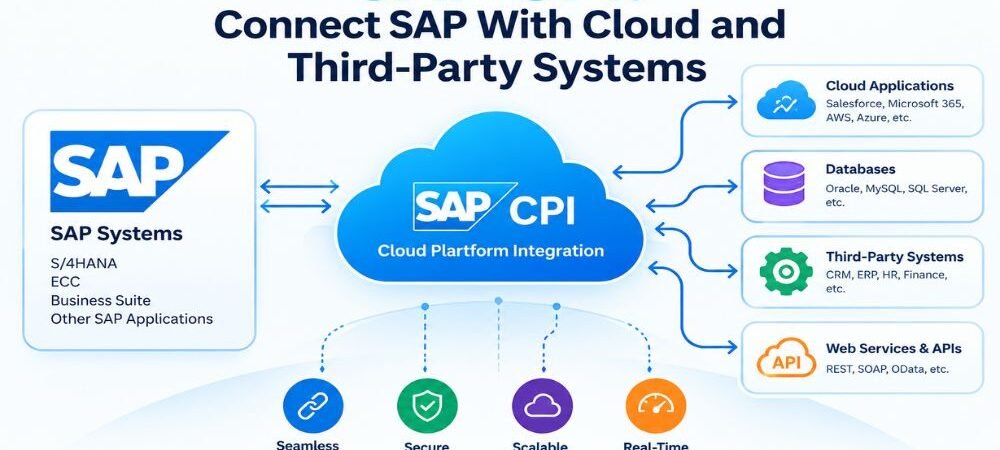
Modern businesses often use several software systems to manage daily operations. SAP may handle enterprise resource planning, finance, procurement, sales, inventory, or supply chain processes. Other systems may manage customer relationships, e-commerce, human resources, payments, analytics, or cloud services.
These systems need to exchange data to keep business processes connected. SAP CPI provides a cloud-based integration capability that can connect SAP applications with cloud applications, third-party systems, APIs, and on-premises applications.
SAP CPI commonly refers to SAP Cloud Integration, which is part of SAP Integration Suite on SAP Business Technology Platform (SAP BTP). SAP Cloud Integration supports application-to-application integration and can connect systems across cloud, on-premises, and hybrid environments.
For example, a business can connect SAP S/4HANA with Salesforce, an e-commerce platform, a warehouse system, or another third-party application through an integration flow.
What Is SAP CPI?
SAP CPI, or SAP Cloud Integration, is a cloud-based integration service used to connect applications and exchange business data.
It provides tools for creating integration flows between sender and receiver systems. An integration flow can receive a message, process the data, transform its structure, apply routing rules, and send the result to a target application.
SAP Cloud Integration supports different integration scenarios, including SAP-to-SAP, SAP-to-non-SAP, cloud-to-cloud, and cloud-to-on-premises connectivity.
The service is part of SAP Integration Suite, which also includes capabilities for API management, event-driven integration, business-to-business integration, and other integration requirements.
How SAP CPI Connects SAP With Third-Party Systems
Different applications often use different interfaces and data structures. SAP S/4HANA may use APIs, OData services, IDocs, or other interfaces, while a third-party application may provide REST or SOAP APIs.
SAP CPI acts as an integration layer between these systems.
A basic integration process can work like this:
Source system → SAP CPI → Data transformation → Business logic → Target system
For example, an online store can send a new order to SAP CPI. The integration flow can transform the order information into the required SAP structure. The processed data can then be sent to SAP S/4HANA for order processing.
The same architecture can be used for other processes such as customer synchronization, product updates, invoice processing, employee data exchange, and inventory updates.
SAP CPI and SAP S/4HANA Integration
SAP S/4HANA is a major SAP enterprise resource planning platform. Organizations can connect S/4HANA with other applications through SAP Integration Suite.
A typical integration may connect:
SAP S/4HANA → SAP CPI → CRM
or:
E-commerce → SAP CPI → SAP S/4HANA
This can allow business information to move between systems without requiring users to manually copy the same data into multiple applications.
The exact integration method depends on the interfaces available in the source and target systems.
SAP CPI for Cloud Applications
Cloud applications are widely used for CRM, HR, finance, e-commerce, analytics, customer service, and other business functions.
SAP CPI can connect SAP applications with cloud platforms when suitable interfaces and authentication methods are available.
For example, an organization can create an integration between SAP and a cloud CRM system. Customer or business transaction data can then be exchanged according to defined business rules.
This type of integration can support both scheduled and event-based business processes, depending on the architecture.
SAP CPI for Third-Party Applications
Third-party systems are applications that are not part of the SAP product landscape. These may include CRM platforms, payment systems, e-commerce platforms, logistics software, databases, HR platforms, and custom applications.
SAP CPI can connect these systems through supported interfaces and adapters.
For example, an e-commerce platform may provide a REST API for order data. SAP CPI can consume the API response, transform the information, and send the required data to an SAP system.
The same process can work in the opposite direction when SAP needs to send product, inventory, pricing, or order information to the third-party platform.
SAP CPI Data Mapping and Transformation
Data mapping is an important part of system integration.
Two applications may store the same business information using different field names, formats, or structures.
For example, one system may use:
CustomerID
while another system may use:
CustomerNumber
An integration flow can map the source field to the required target field.
SAP Cloud Integration also supports message transformation and mapping capabilities. These functions allow data to be processed before it reaches the receiving application.
Transformation may involve changing:
- Field names
- Data structures
- Date formats
- Number formats
- XML structures
- JSON structures
- Business values
The required transformation depends on the interfaces and data models used by the connected applications.
SAP CPI APIs and Application Connectivity
APIs allow software systems to communicate through defined interfaces.
SAP Integration Suite includes API Management, which provides capabilities for managing APIs. SAP CPI can work with API-based integration scenarios where applications expose services through APIs.
For example, a third-party application may expose a REST API for customer information. An integration flow can use that API to retrieve data and process it before sending it to SAP.
API-based integration can also work in the opposite direction. SAP data can be exposed through an API and consumed by another authorized application.
Authentication, authorization, encryption, and access controls need to be configured according to the integration requirements.
SAP CPI for Hybrid Integration
Many organizations operate a combination of cloud and on-premises applications.
For example, a company may have an on-premises SAP ERP system while using cloud-based CRM and e-commerce applications.
SAP CPI can serve as an integration layer between these environments.
A hybrid architecture may look like:
On-Premises SAP → SAP CPI → Cloud CRM
This allows organizations to connect existing enterprise systems with cloud services without moving every application into the same environment.
SAP Integration Suite is designed to support cloud, on-premises, and hybrid integration scenarios.
SAP CPI Integration Flow
An integration flow defines how information moves between connected applications.
A typical flow includes a sender, processing steps, and a receiver.
The sender provides the original message. SAP CPI receives and processes the message. Processing can include mapping, filtering, validation, routing, transformation, or enrichment. The receiver then gets the processed message.
For example:
Customer order → API request → SAP CPI → Data mapping → Validation → SAP S/4HANA
If an error occurs, the integration design can include error-handling processes and monitoring mechanisms.
SAP CPI for Business Process Automation
System integration can support automated business processes.
Consider an online order process. A customer places an order on an e-commerce website. The order information can be sent to SAP CPI through an API. SAP CPI processes the message and sends the required information to SAP S/4HANA.
The SAP system can then process the order according to its configured business rules.
Other automated scenarios can include inventory synchronization, invoice processing, customer data synchronization, employee information exchange, and supplier data processing.
Automation requirements depend on the business process and connected systems.
SAP CPI Security
Enterprise integrations can process business and customer information. Security is therefore an important part of integration architecture.
SAP Integration Suite provides security capabilities for integration and API scenarios.
An integration implementation may need to address authentication, authorization, secure communication, credentials, certificates, access controls, and monitoring.
The correct security model depends on the systems being connected and the type of data being exchanged.
Organizations should also apply their internal security policies and relevant compliance requirements when designing integration flows.
SAP CPI Monitoring and Error Handling
Integration monitoring helps technical teams identify whether messages are processed successfully.
Monitoring can help identify issues such as:
- Authentication failures
- Invalid data
- Mapping errors
- API failures
- Connectivity problems
- Target system errors
An effective integration design should define how errors are detected and handled.
For example, a failed message may need to be logged, retried, or sent to an error-handling process. The correct method depends on the business process and technical architecture.
SAP CPI Use Cases
SAP CPI can support many enterprise integration scenarios.
A retailer can connect an e-commerce platform with SAP for orders, products, pricing, and inventory.
A manufacturer can connect SAP with warehouse, logistics, supplier, and production systems.
A service company can connect CRM applications with SAP customer and financial processes.
An organization can connect HR applications with SAP to exchange employee information.
Businesses can also use integration flows for B2B communication with suppliers, distributors, logistics providers, and other partners.
Each use case requires a separate integration design based on data requirements, interfaces, security, processing rules, and business needs.
SAP CPI and SAP Integration Suite
SAP CPI is part of the wider SAP Integration Suite ecosystem.
SAP Integration Suite provides several capabilities for connecting applications, APIs, business partners, and events. These include Cloud Integration, API Management, Event Mesh, Integration Advisor, and other integration services.
This broader platform allows organizations to build integration architectures that extend beyond simple application-to-application connections.
For example, an organization may use SAP CPI for application integration and API Management for controlled API access.
Event Mesh can support event-driven scenarios where applications need to react to business events.
AEO and GEO for SAP CPI Content
AEO means Answer Engine Optimization. It focuses on creating content that clearly answers questions used in search engines and AI-powered answer systems.
For example:
What is SAP CPI?
SAP CPI refers to SAP Cloud Integration, a cloud-based integration capability within SAP Integration Suite that connects SAP and third-party applications across cloud, on-premises, and hybrid environments.
GEO, or Generative Engine Optimization, focuses on making information clear and structured for AI-powered search and generative systems.
For a technical topic such as SAP CPI, useful GEO content should include clear definitions, relevant SAP entities, technical terms, use cases, integration methods, and direct answers.
Using terms such as SAP S/4HANA, SAP Integration Suite, SAP BTP, API Management, REST API, SOAP, OData, IDoc, cloud integration, hybrid integration, data mapping, and message transformation provides clear technical context.
Frequently Asked Questions
What is SAP CPI used for?
SAP CPI is used to connect SAP and non-SAP applications and exchange data between them. It can support cloud, on-premises, and hybrid integration scenarios.
Can SAP CPI connect SAP with third-party applications?
Yes. SAP Cloud Integration can connect SAP applications with third-party applications through supported APIs, adapters, and integration methods.
Can SAP CPI connect SAP S/4HANA with cloud applications?
Yes. SAP S/4HANA can be integrated with cloud applications through SAP Integration Suite and suitable integration interfaces.
Does SAP CPI support APIs?
Yes. SAP Cloud Integration can participate in API-based integration scenarios. SAP Integration Suite also provides API Management for managing APIs.
What is the difference between SAP CPI and SAP Integration Suite?
SAP Cloud Integration is an integration capability within SAP Integration Suite. SAP Integration Suite is the broader platform that includes application integration, API management, event-driven integration, and other integration capabilities.
Can SAP CPI integrate on-premises systems?
Yes. SAP Cloud Integration supports hybrid scenarios where cloud services communicate with on-premises applications.
Does SAP CPI support data transformation?
Yes. SAP Cloud Integration provides mapping and transformation capabilities for processing data between different systems and structures.
Conclusion
SAP CPI provides a cloud-based approach for connecting SAP applications with cloud platforms, third-party applications, APIs, and on-premises systems. It can process messages, transform data, route information, and support automated business processes.
For businesses using SAP S/4HANA together with multiple external applications, integration can provide a structured way to exchange information between systems. SAP Integration Suite extends this architecture with API Management, event-driven integration, B2B capabilities, and other integration services.
A successful SAP integration requires clear system requirements, interface planning, data mapping, security controls, error handling, monitoring, and a suitable integration architecture. When these technical requirements are defined clearly, SAP CPI can serve as an important integration layer for connected enterprise applications and modern hybrid business environments.